Gcc 4.3 and Header issues
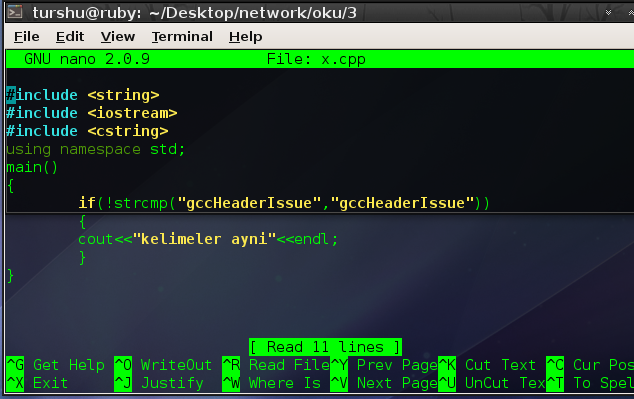 I’m using gcc 4.3.3 version and nowadays i’m trying to write hybrid file transfer system with c++ on Linux.The problem is i used to use some function in c or c++ like strcmp() with including string library but now when i try to compile I’m getting some error like
error: ‘strcmp’ was not declared in this scope
Simple example code
In gcc 4.1 version i can compile this code without any error or warning
-
#include <string>
-
#include <iostream>
-
"gccHeaderIssue","gccHeaderIssue""kelimeler ayni"
Re-Enable restarting X server with Ctrl+Alt+Backspace in Jaunty
Normally, we can restart x server with CTRL+ALT+BACKSPACE keyboard combination in an older version of Ubuntu.But in jaunty this is not possible because newer version of Xorg disabled this property.So that if we want to re-enable this feature we just have to modify Xorg.conf file,lets do that from console
sudo nano /etc/X11/xorg.conf
then add this 3 line to it
-
Section "ServerFlags"
-
Option "DontZap" "False"
-
EndSection
then save the file and quit.Logout and login again, it should be work.

Ruby’de Sayiyi Yaziya Ceviren Program
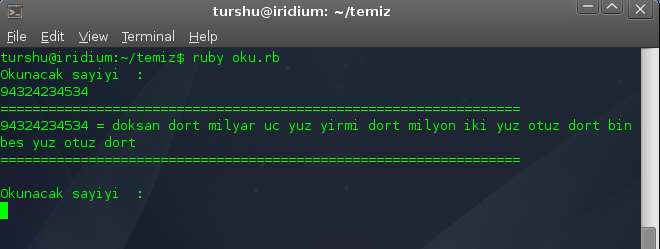 Ruby ile yapilmis sadece algoritma gelistirmeye yonelik bir calisma .Konsol programi olmakla beraber eger istenirse glade ile arayuz yapilip ve ya bir kac degisiklik yapilarak eklenti haline getirilebilir.Ornegin doviz birolari icin verilen paranin miktarini gonderip turkce okunus karsiligini geri gonderen bir fonksiyona donusturulebilir.Herneyse olayin genel mantigini anlatmak gerekirse eger turkce sayilarin okunusuna dikkat ederseniz,ilk uc haneden sonra bundan sonra gelen hanelerin sonuna basamak adi getirilerek devam edilir.Bir kac ornek ;
321 = Uc yuz + yirmi + bir
234754 = iki yuz +otuz +dort – bin – yedi yuz+ elli +dort // goruldgu gibi uc hane seklinde tekrarlaniyor sadece her uc hanede bir basamak adi ekleniyor.
Ozel durumlar :
Bu durumlar goz onunde bulundurularak bir kod yazmak istersek kisaca yazacagimiz kod soyle olmalidir.Sayimiz kac tane uclukten olusuyor.Bu uclukleri sirasiyla yazdirdiktan sonra (sayi degerini basamak degerini falan bulduktan sonra).Push yapip stack’a atiyoruz her atma olayindan once kacinci basamakta oldugumuzuda konrol edip sonuna ekliyoruz ki pop yaptigimizda sonucumuz sirali gelsin.Peki ama sayimiz ucun kati degilse bu olusacak ucluler patlamayacakmi bunuda en sondaki kalan kisminda tekrar baska uclu varmiscasina ama kac haneli olduguna bakarak ve ozel durumlarin ustesinden geliyoruz.
› Continue reading
Ubuntu Volume Wheel Problem [ Fix ]
I have a toshiba u305-s5077 laptop.It had a problem with volume wheel like when i tried to use volume wheel it makes the volume iteratively maximize or minimize(And it has no end).While it is happening i cant write anything or i cant click something.That’s why i had to restart X screen with CTRL+ALT+BACKSPACE.
I search the internet and i found a solution for it.
At first if it won’t work if you don’t want to kill X screen at least you can use this;
Change your status to text mode via using CTRL+ALT+ {F1-F2-F3-F4-F5-F6}.Then turn back X Screen with ALT+F7.
Lets make it works:
Firstly lets create a backup if it wont work or if something goes wrong we can handle it.
› Continue reading
Tags
Recent Posts
- PriveMall Davetiye
- Polymorphism (Overloading)
- Nautilus ve Ssh Bağlantısı
- Highlighting Nano
- Difference between C++ Class and C struct
- Gcc 4.3 and Header issues
- Re-Enable restarting X server with Ctrl+Alt+Backspace in Jaunty
- I Installed BETTER
- Ruby’de Sayiyi Yaziya Ceviren Program
- Ubuntu Volume Wheel Problem [ Fix ]
- Google Android
- Encoding mysql dump file while importing from console
- Ubuntu altinda mp3 kesmek {Cutting mp3 files over ubuntu}
- Flv’den mp3 elde eden bash programi {Converting flv to mp3}
- Video Sitelerinden İçerik İndirmek ve Videolardan Ses Almak